Advantages, Structure - Email | 11th Computer Applications : Chapter 9 : Introduction to Internet and Email
Chapter: 11th Computer Applications : Chapter 9 : Introduction to Internet and Email
Email
Electronic
mail or email is information stored on a computer that is exchanged between two
users over telecommunications.
Email
is a message that may contain text,
files, images or any other attachments sent through a network to a specified
individual or group of individuals.
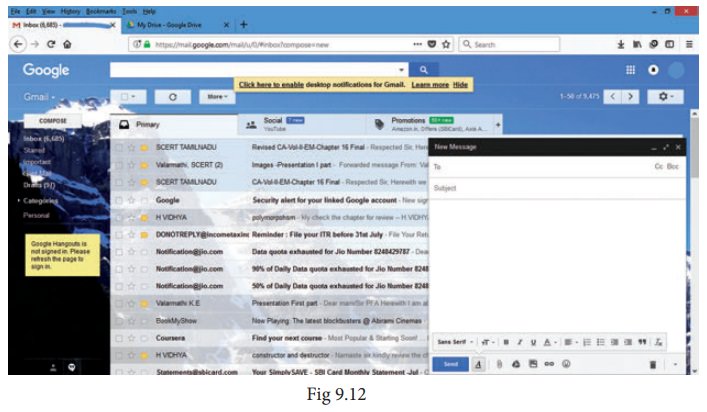
Structure of email
Click
the Compose button and then writing
an e-mail contents
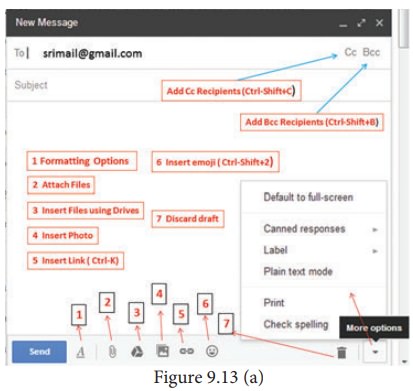
When sending an e-mail message,
several fields are required to be filled:
•
The
To field is where you type the
e-mail address of the person who is the recipient of your message.
• The From field should contain your e-mail address.
•
If
you are replying to a message, the To and From fields are automatically filled
out; if it's a new message, you'll need to enter them manually.
•
The
Subject should consist of a few
words describing the e-mail's contents. The Subject lets the recipient see what
the e-mail is about, without opening and reading the full e-mail. This field is
optional.
•
The
CC (Carbon Copy) field allows you to
specify recipients who are not direct addressees (listed in the "To"
field). This field is optional.
•
The
BCC (Blind Carbon Copy) field is
similar to CC, except the recipients
are secret. Each BCC recipient will
receive the e-mail, but will not see who else received a copy. The addressees
(anyone listed in the "To" field) remain visible to all recipients.
This field is optional.
•
Finally,
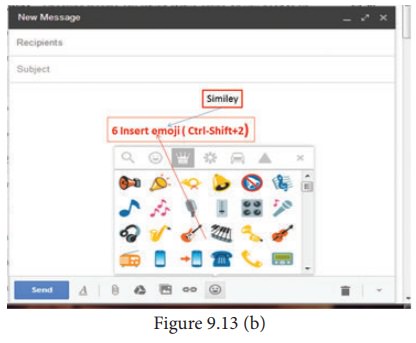
the Message Body is the location you
type your main message. It often contains your signature at the bottom; similar
to a hand-written letter.
Advantages of email
Some
of the main advantages of email are listed below.
•
Free delivery - Sending an e-mail is virtually
free, outside the cost of Internet service.
There is no need to buy a postage stamp to send a letter.
•
Global delivery - E-mail can be sent to nearly
anywhere around the world, to any country.
•


 Instant delivery -
An e-mail can be instantly sent and received by the recipient over the Internet.
•
File attachment - An e-mail can include one or more
file attachments, allowing a person to
send documents, pictures, or other files with an e-mail.
•
Long-term storage - E-mails are stored electronically,
which allows for storage and archival over
long periods of time.
•
Environmentally friendly - Sending an e-mail does not require
paper ( Paperless )), cardboard, or
packing tape, conserving paper resources.
What
is sent in an email
In
addition to text messages being sent over e-mail, it is also possible to attach
a file or other data in an e-mail. For example, an attachment could be a
picture, PDF,word processor document,, or any file stored on the computer.
Related Topics